- Web
- AI
- AI Automation
- E-commerce
Amazon Operations Dashboard
An integrated workspace for Prohall’s Amazon advertising, seller operations, and campaign automation—built to turn scattered account data into decisions people can review.
- Technologies
- Next.js
- React
- TypeScript
- Tailwind CSS
- TanStack Query
- Apache ECharts
- +8 more
What this project is.
- What the client needed
- Running an Amazon business involves more than reading an advertising report. Campaign performance, seller revenue, product costs, inventory, and keyword research answer different questions. Prohall needed a shared operational workspace that could bring these sources together while preserving the context behind each number.
- What we built
- PMIP—the Prohall Marketing Integration Platform—is a Next.js application backed by a NestJS API and PostgreSQL. It combines an executive dashboard, campaign and search-term analytics, Seller Central workspaces, DataDive research, and reviewable automation. Teams can move from an account-level trend to the campaigns and rules behind it within the same interface.
- Why it mattered
- The central engineering decision was to separate observation from action. A dashboard can refresh data without changing an advertising account. Recommendations and automation plans pass through their own permissions, review steps, and execution controls. This gives the team a place to investigate performance before deciding what should change.
At a glance
- Advertising, seller operations, and research in one workspace
- Reporting dates and attribution remain visible
- Automation plans with review and write controls
- Scheduled ingestion with resumable background tasks
What stood in the way.
The challenge was making a complex operating system understandable without hiding the limitations of its data. Amazon reports arrive asynchronously, conversion attribution changes over time, and an advertising metric is not the same thing as total store revenue.
- 03
Business constraints
- Give advertising and operations teams a shared view of campaigns, sales, product economics, and inventory.
- Make large campaign and search-term datasets practical to inspect, filter, compare, and export.
- Support repeatable optimization while keeping account changes deliberate and accountable.
- 04
Technical constraints
- Coordinate Amazon Ads, Selling Partner, and DataDive integrations with separate data models and refresh cycles.
- Handle pending reports, repeated requests, rate limits, and interrupted serverless work without starting duplicate jobs.
- Keep reporting windows aligned with account timezones and show incomplete coverage instead of presenting partial totals as final.
- Apply permissions and write restrictions on the API as well as in the interface.
- 03
What the old system could not do
- Separate source consoles do not provide a shared navigation and review workflow across advertising, seller operations, and research.
- A static export cannot communicate an ingestion task’s progress or refresh itself when a pending report becomes available.
- A recommendation alone does not provide approval, execution history, or a preview of how an applied change could be reversed.
From brief to build.
01 / Discovery
Organize the product around operational decisions
The delivered product groups work into Amazon Ads, Seller Central, and DataDive. This keeps the major business domains recognizable while giving them a common shell, account context, and permission model.
- Domain-based navigation
- Executive and specialist workspaces
- Shared account context
02 / Technical planning
Define what every metric actually means
Reporting surfaces distinguish ad-attributed sales from store sales and retain the profile’s timezone. Coverage and attribution metadata travel with the totals so the interface can explain missing or still-changing data.
- Account-aware date windows
- Report coverage metadata
- Explicit attribution context
03 / Architecture
Separate the interface, ingestion, and execution
A same-origin frontend proxy connects the application to a modular NestJS API. PostgreSQL stores imported records, durable task state, and operational history. Scheduled workers ingest data; approved execution paths handle external mutations separately.
- Typed frontend and backend boundaries
- Durable background tasks
- Independent write controls
04 / Design
Make dense information navigable
A persistent navigation rail, contextual tabs, date controls, and consistent tables give each workspace the same interaction language. Summary widgets lead into charts and detailed metrics, while the responsive shell adapts navigation for smaller screens.
- Reusable workspace components
- Configurable dashboard widgets
- Responsive navigation
05 / Build
Connect analysis to controlled automation
Campaign analysis, seller workspaces, research tools, and rule builders sit alongside the optimization engine. Deterministic recommendations establish the proposed changes; optional AI interpretation explains supplied evidence without rewriting the recommendation values.
- Campaign and seller analytics
- Rule and strategy workflows
- Evidence-bound AI interpretation
06 / Launch & scale
Support recurring refreshes and inspectable operations
The Vercel deployment includes a five-minute scheduler entry point. Task leases, reuse of pending reports, and resumable work help ingestion continue across runs. The interface refreshes its query cache periodically and distinguishes background activity from a user-initiated sync.
- Scheduled refresh pipeline
- Task and report status
- Audit and execution history
How it works.
An advertising command center
Start with the account picture, then investigate the campaigns and search terms that explain it.
- Executive dashboard
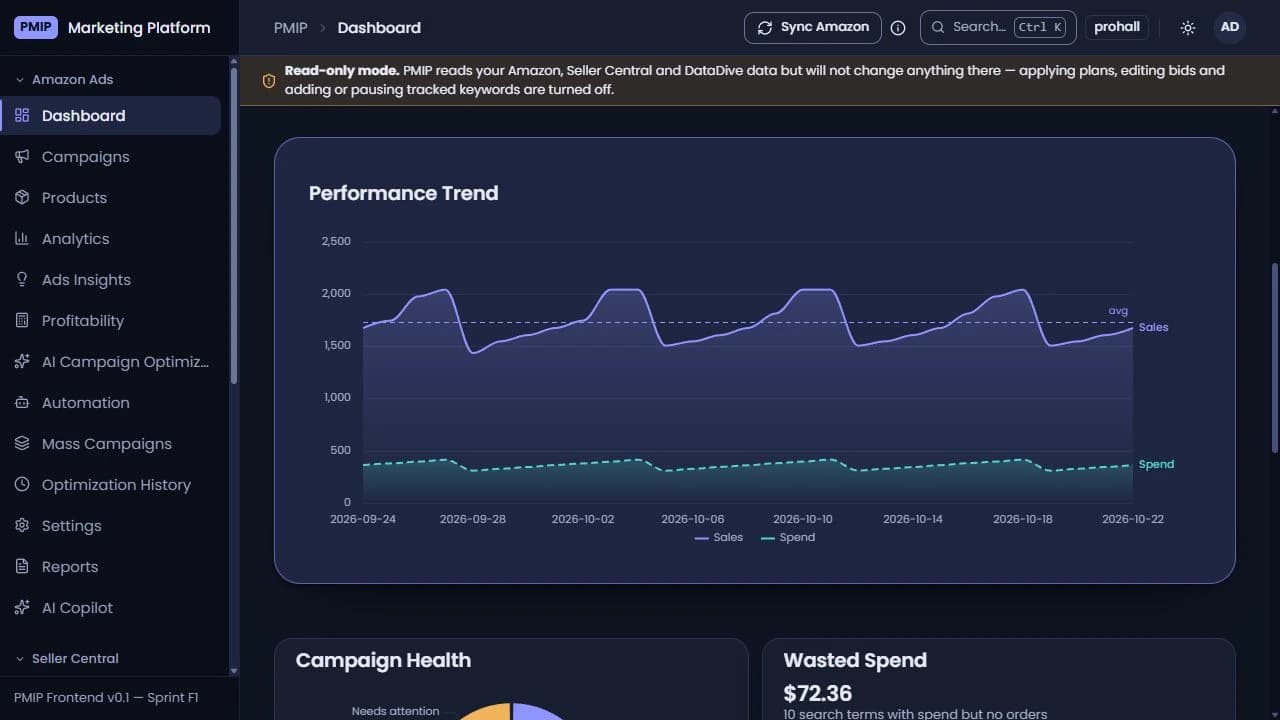
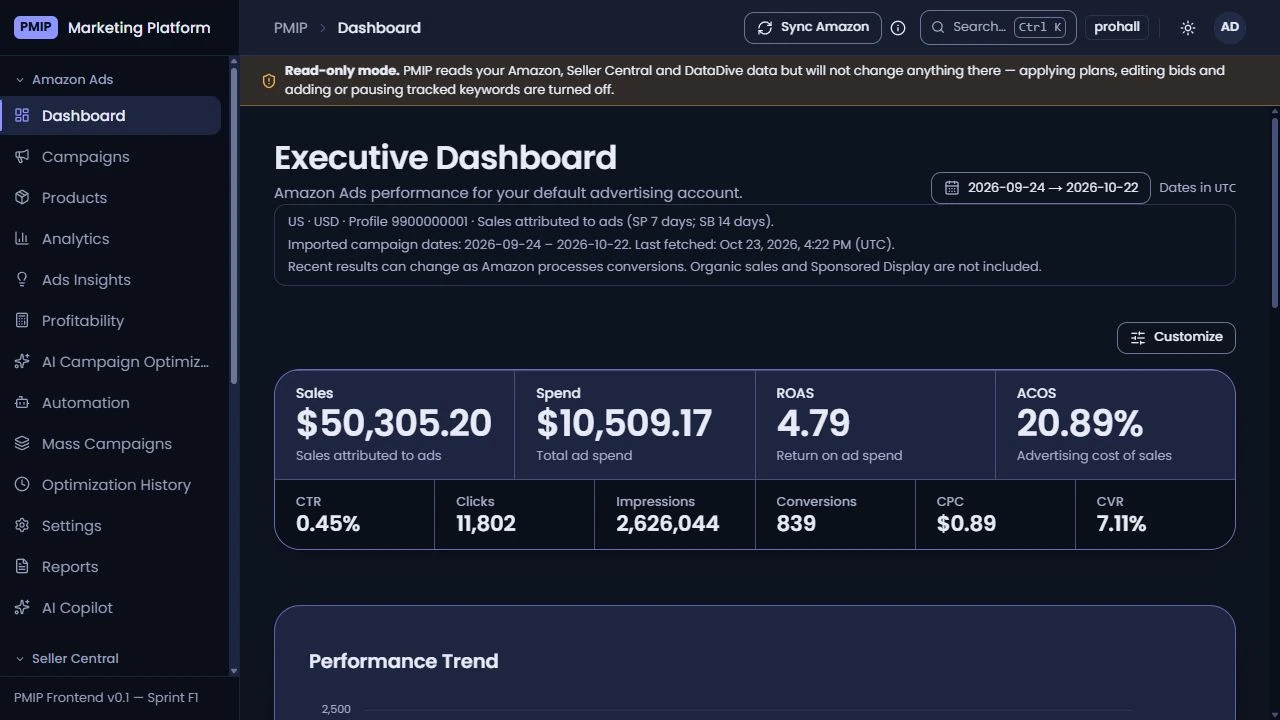
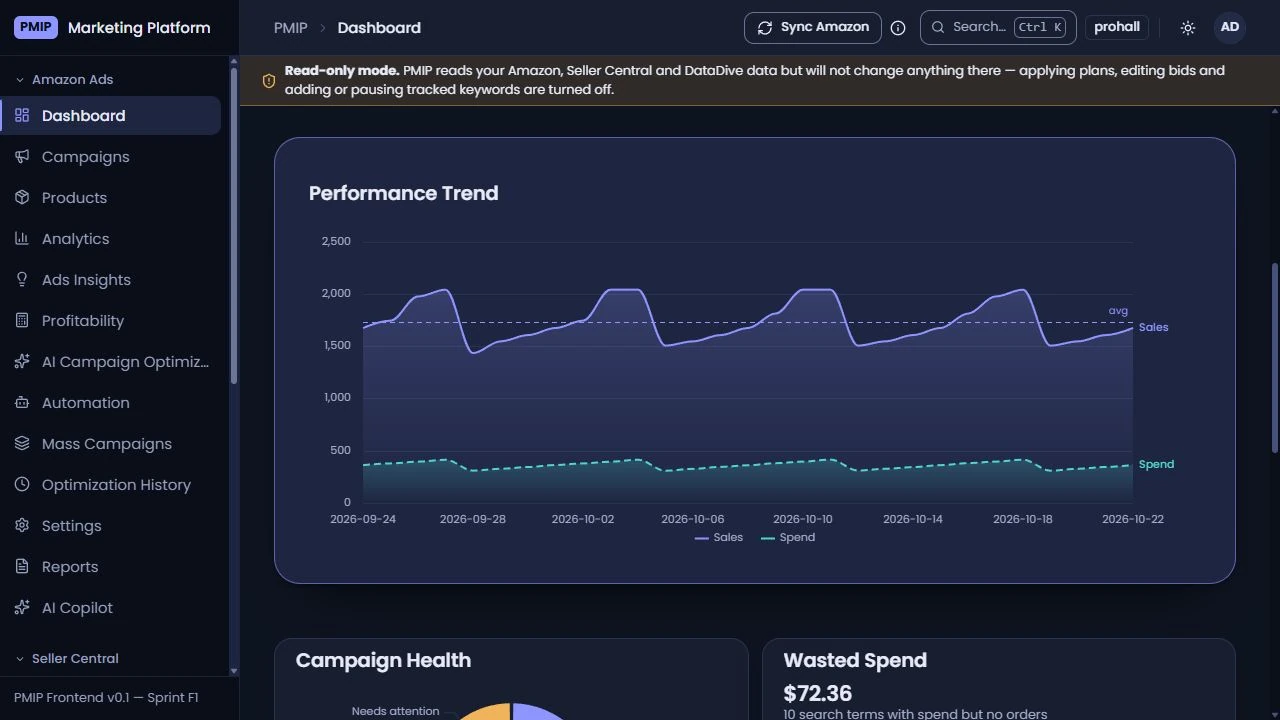
Sales, spend, ROAS, ACOS, clicks, impressions, and conversion metrics share a reporting window, with customizable widgets and performance trends.
- Campaign analysis
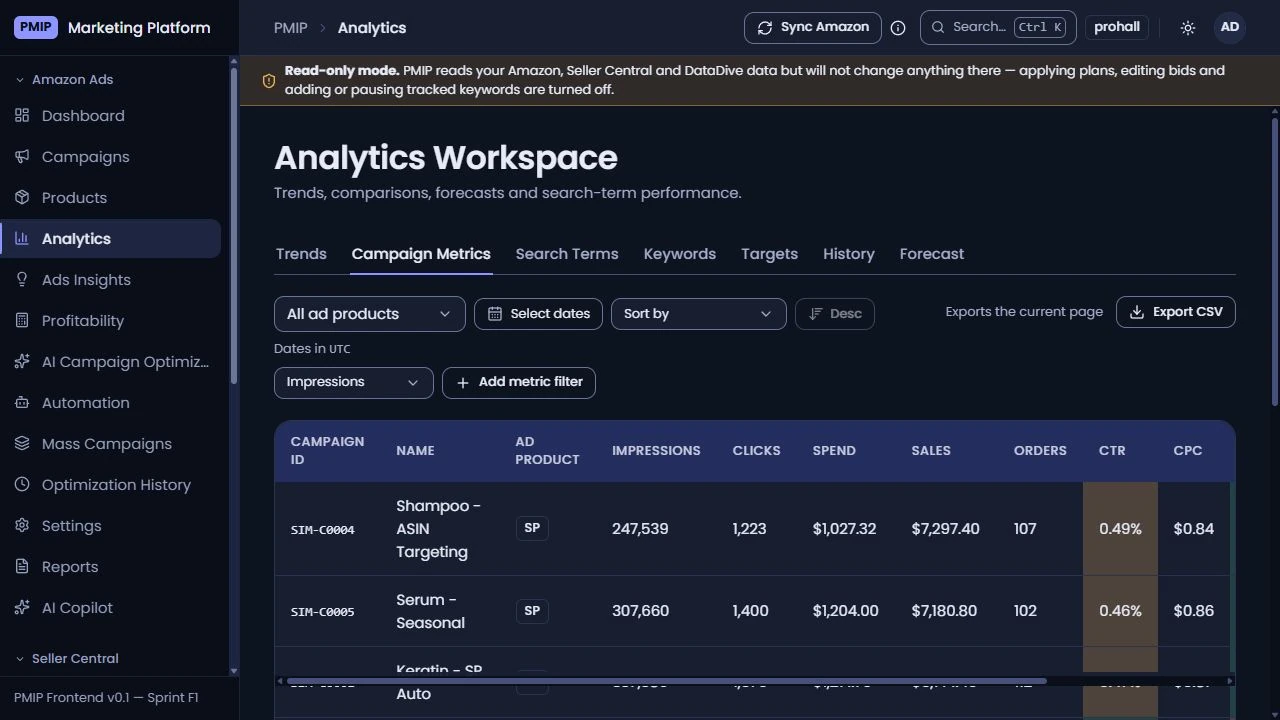
Campaign, keyword, target, and search-term views expose detailed metrics, sorting, filters, and CSV export.
- Visible data context
The dashboard shows the reporting timezone, attribution windows, imported dates, and coverage warnings alongside the figures.
- Attention signals
Campaign health and wasted-spend views help users find areas that deserve investigation before changing bids or budgets.
Seller operations beside advertising
Business context extends beyond attributed ad sales into product costs, stock, and demand.
- Business and sales workspaces
Selling Partner API integration supplies dedicated views for seller performance and sales analysis.
- Products and costs
Product-level cost inputs and effective dates support a more useful view of product economics.
- Restock planning
Inventory planning incorporates lead times, safety stock, target coverage, and units in production or transit.
- Research integration
DataDive workspaces bring niche research, keyword ranking, alerts, and usage information into the same application.
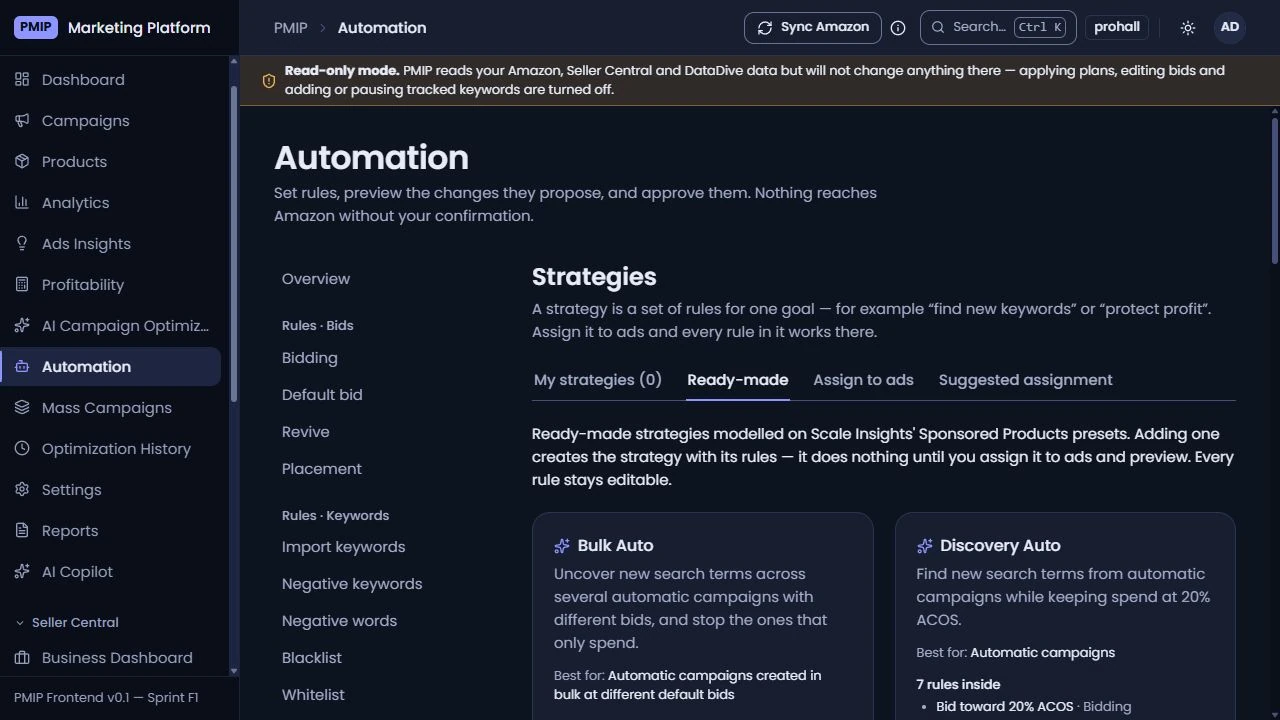
Automation that remains reviewable
Reusable rules and optimization recommendations lead to controlled plans rather than hidden account changes.
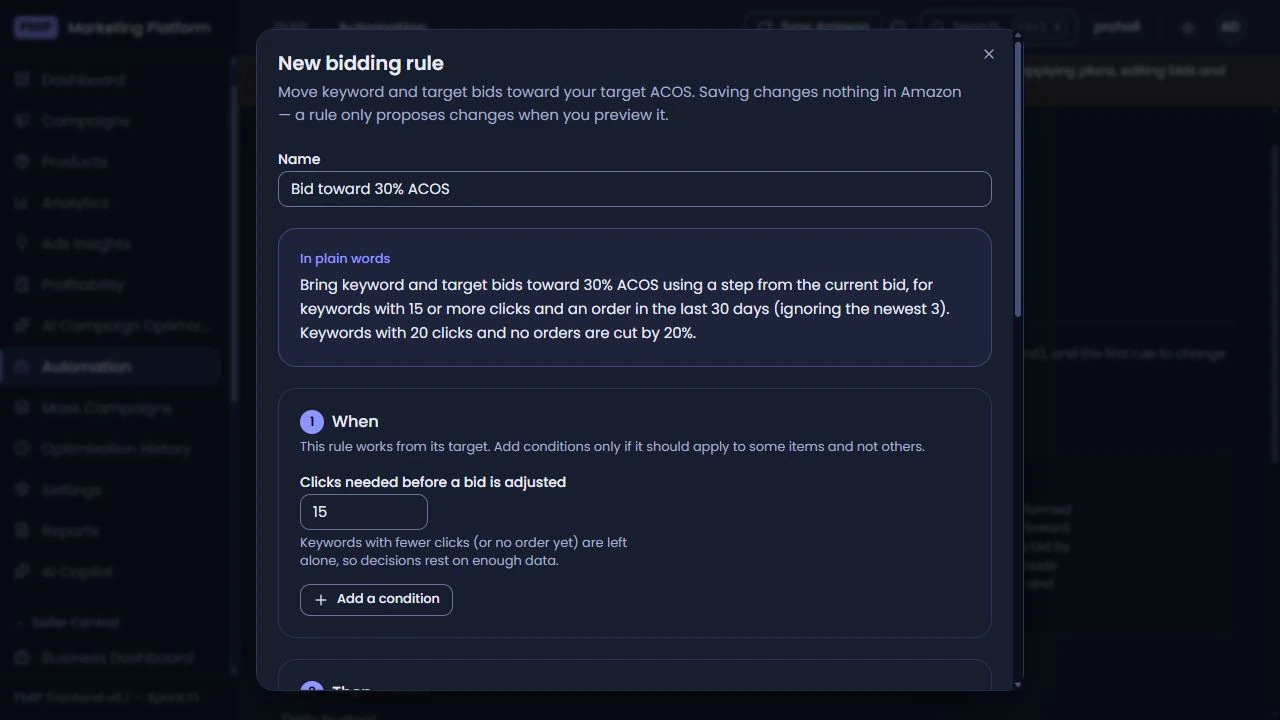
- Rules and strategies
The rule catalog covers bidding, keyword harvesting, negatives, placement, status, budgets, and custom conditions, with editable presets.
- Plan review
Proposed operations have a review stage before execution, with feature-level permissions governing which external changes are allowed.
- Optimization evidence
The optimization engine records recommendation types, risk, and confidence; optional AI interpretation explains the supplied evidence within a validated response format.
- Execution history
Applied optimization actions retain an audit trail, and supported reversals use a fresh rollback preview before confirmation.
- Read-only operation
An explicit mode lets the platform read connected data while preventing external bid, plan, and tracking mutations.
Infrastructure for ongoing account work
Data ingestion and browser performance are treated as part of the product experience.
- Resumable synchronization
Durable tasks preserve progress across execution windows, while leases and pending-report reuse reduce overlapping work.
- Scheduled refresh
A five-minute scheduler can enqueue read-only refreshes when enabled. Report availability still depends on the upstream service.
- Focused loading
Dashboard widgets load as separate modules, and TanStack Query manages cached requests and periodic refreshes.
- Consistent authorization
Module permissions shape navigation and available widgets; backend guards enforce access to the corresponding API operations.
How the pieces connect.
The browser reads through the application API. Background tasks ingest external reports into PostgreSQL, while controlled execution paths handle approved changes. AI interpretation is optional and receives bounded recommendation evidence.
- Data flows from PMIP workspace to Application API.
- Data flows from Application API to PostgreSQL.
- Data flows from Application API to Integration workers.
- Data flows from Application API to Controlled execution.
- Data flows from Application API to AI interpretation.
- Data flows from Integration workers to Amazon Ads.
- Data flows from Integration workers to Selling Partner API.
- Data flows from Integration workers to DataDive.
- Data flows from Controlled execution to Amazon Ads.
- Data flows from Controlled execution to DataDive.
Inside the build.
Select a screenshot to inspect it at full size.
What changed.
A unified operations workspace
Delivered a shared interface for advertising analysis, seller operations, research, and campaign automation.
Made reporting context visible so users can distinguish imported, partial, and still-changing advertising data.
Connected repeatable rules to reviewable plans, permission checks, and operational history.
Added scheduled ingestion and resumable work to support recurring account refreshes.
This case study documents the implemented product. No revenue lift, ROAS improvement, or time-saving percentage is claimed.
Verified figures have not been published for this engagement. These are the outcomes the team can attest to.
What it is built with.
Frontend
- Next.js
- React
- TypeScript
- Tailwind CSS
- TanStack Query
- Apache ECharts
Backend
- NestJS
- Node.js
Data
- PostgreSQL
Commerce
- Amazon Ads API
- Amazon Selling Partner API
- DataDive API
AI
- OpenRouter
Infrastructure
- Vercel
Have a similar project in mind?
Tell us the constraint you are trying to remove. A senior engineer reads every enquiry and replies within one business day.